Old English Font Generator
Type any text and instantly copy medieval Old English font styles for gaming names, Instagram, Discord & more. 𝕺
The Free Old English Font
Generator
Type any text and instantly copy medieval Old English font styles for gaming names, Instagram, Discord & more.
4+ Medieval Styles
Old English, Fraktur, bold gothic and more — all completely free.
Instant Preview
Preview available styles as you type.
One-Click Copy
Tap any Old English font card and it copies instantly.
Works Everywhere
Use generated text on compatible platforms; character support can vary.
Old English Font Generator — Medieval Blackletter Text Online
Use TextFancify's free Old English font generator to turn ordinary text into decorative blackletter-inspired characters. Enter a name, word, or short phrase, compare the available styles, and copy the result for compatible social profiles, messages, gaming names, or creative projects.
This Old English Font Generator runs in your browser and provides an instant preview. No separate font download is needed when you use the Old English Font Generator to create Unicode-style text, although the appearance can vary across apps and devices.
For best results with this Old English Font Generator, start with a short phrase, select a style, preview each letter, and use the Copy button. Then paste the result into your chosen app and check how it displays before saving or posting.
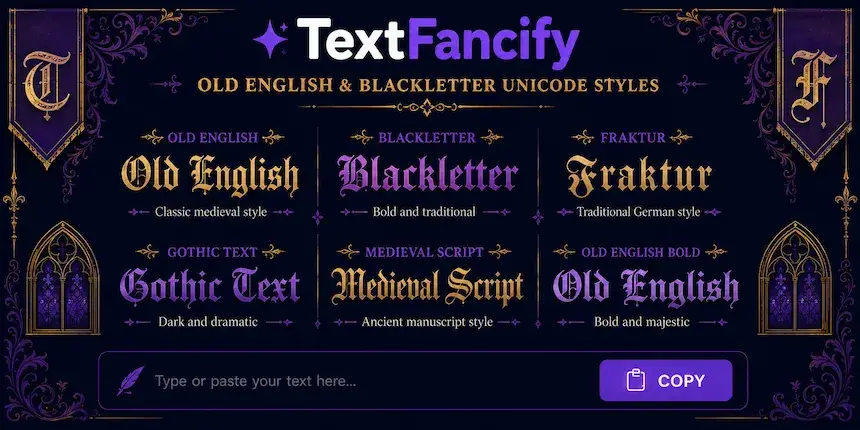
Explore Old English, Fraktur, and Gothic Styles
Blackletter-inspired styles use distinctive angular forms and strong strokes, but they do not all look the same. The Old English option in this Old English Font Generator aims for a traditional medieval appearance, Fraktur has its own historical letterforms, and Bold Gothic offers a heavier look. Preview the choices to find the best fit for your text.
These labels are often used loosely in online font searches. Historically, Fraktur is one style within the wider blackletter family, while “Gothic” can refer to several different visual styles depending on context.
How to Use the Old English Font Generator
- Enter your text. Type a name, nickname, word, or short phrase in the input field above.
- Choose a style. Select Old English, Fraktur, Bold Gothic, or another available option.
- Preview the result. Check all letters, numbers, and symbols before copying.
- Copy your text. Click the Copy button on the style card you prefer.
- Paste it into an app. Use the relevant profile, username, caption, message, or document field.
- Check compatibility. Some apps or devices may display certain characters differently or may not accept them.
Generated Unicode text is different from an installed font file. Unicode-style characters can usually be copied into compatible text fields without installing a typeface, but they may not provide the precise appearance or full character set of a real font.
Old English Font Generator for Instagram and Other Platforms
The Old English Font Generator can help personalise short profile text and display names with decorative characters. Support depends on the platform, the specific field, and the characters used, so always check the result before publishing it.
Generate and copy your preferred text, open Instagram, and paste it into a supported profile field, caption, or comment. If a character appears as a box or an unexpected symbol, try another style or use a standard letter instead.
TikTok, Discord, and gaming names
Try the copied text in a supported TikTok or Discord field, or in a game that allows decorative Unicode characters. Username rules and character support vary, so a style that works in one place may be rejected or displayed differently somewhere else.
WhatsApp, Word, and Google Docs
You can usually paste Unicode-styled characters into compatible messaging apps and documents without installing a separate font. The appearance depends on the characters supported by the app and the fonts available on the device. For documents that require consistent typography, an installable blackletter font may be more suitable.
Old English Text Generator vs. a Real Font
The phrase “font generator” can refer to different tools. This comparison explains which option may suit your project.
| Feature | Unicode text generator | Installable font file | Image-based lettering |
|---|---|---|---|
| Output | Decorative text characters | A typeface used by compatible software | An image of styled lettering |
| Copy into text fields | Usually, where supported | Requires the font to be available in the destination | Not as editable text |
| Installation | Not normally required | Often required or selected in compatible software | Not required to view the image |
| Best use | Profiles, usernames, and messages | Documents, websites, and design projects | Logos, posters, and visual mock-ups |
TextFancify is designed for copyable decorative text. For exact spacing, a complete alphabet, print-ready artwork, or a professional logo, a real blackletter font or vector design may offer more control.
What Are Old English Fonts?
“Old English font” is commonly used online to describe lettering inspired by blackletter. Blackletter developed in medieval Western Europe and became associated with manuscript writing and early printing. Its letterforms often have dense strokes, angular shapes, and strong contrast.
Historical blackletter includes styles such as Textura, Rotunda, Schwabacher, and Fraktur. These styles are related, but they are not identical. Also, Old English is the name of a historical English language; a decorative text generator changes the appearance of characters and does not translate modern English into that language.
For more background, see the overview of blackletter typography.
Is This Old English Font Generator Free?
You can use the TextFancify Old English Font Generator without paying to download a font or creating an account. Enter your text, compare the styles provided, and copy the version you prefer. If you separately download a font for a logo or commercial project, check that font's licence for the intended use.
Frequently Asked Questions About Old English Fonts
Why Use TextFancify?
The Old English Font Generator on TextFancify lets you preview several decorative text styles in one place. Enter a short phrase, compare the available results, and copy the version that suits your profile or creative project.
The browser-based tool is designed for quick experiments with Unicode-style text. Because special characters are not displayed identically in every app or font, review your copied text in its final destination before using it publicly or in an important design.
More Free Text Generators on TextFancify
- Bold Text Generator — create bold Unicode-style text
- Fancy Text Generator — explore decorative text styles
- Cursive Font Generator — try flowing, handwritten-inspired styles
- Italic Font Generator — create slanted text styles
- Glitch Text Generator — experiment with distorted text effects
- Font Generator — browse more text styles