Font Generator — Fancy Text Styles
Type any text and instantly copy 200+ beautiful font styles for Instagram, WhatsApp, gaming names, TikTok bios & more. ✨
The Font Generator
for Fancy Text
Type any text and instantly copy 200+ beautiful font styles for Instagram, WhatsApp, gaming names, TikTok bios & more.
200+ Font Styles
Bold, cursive, aesthetic, glitch, bubble and many more — all free.
Instant Preview
Every font updates in real time as you type. No loading, no waiting.
One-Click Copy
Tap any font card and it copies instantly to your clipboard.
Works Everywhere
Instagram, WhatsApp, Discord, gaming — Unicode works on all platforms.
Font Generator — The Easiest Way to Get Stylish Text Online
TextFancify is a free font generator that instantly converts your plain, boring text into 200+ beautiful Unicode font styles. No downloads, no sign-ups, no complicated settings — just type and copy. It really is that simple.
Whether you want to make your Instagram bio look stunning, give your gaming name a unique edge, or just send a friend a funny message in bubble text — this fancy text font generator has you covered. And the best part? Every single style works on almost every app and platform you can think of.
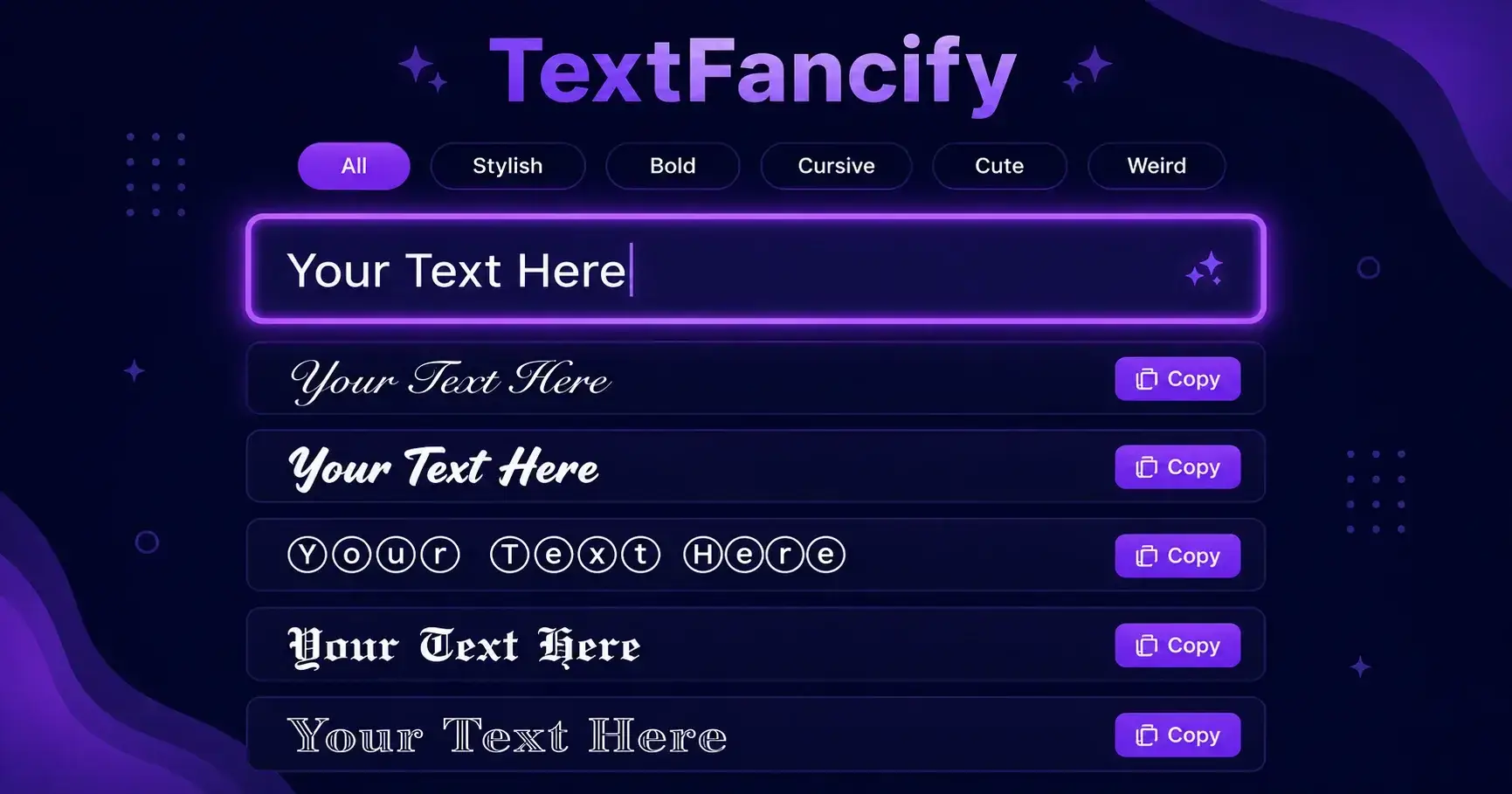
How to Copy and Paste Fonts in 3 Steps
Using this font generator could not be easier. There is no learning curve, no tutorial needed. Here is all you do:
- 1Enter your textType or paste any word, name, or sentence into the input box above.
- 2Browse the styles200+ font styles appear instantly. Use filter chips to browse by category.
- 3Click to copyTap any font card — copies to clipboard instantly. Paste anywhere.
That is genuinely it. Most people are copying their first fancy text style within 10 seconds of landing on this page. No joke.
Where Can You Use This Font Generator?
Instagram does not allow custom fonts natively — which is exactly why a font generator like TextFancify exists. Your bio is one of the first things people see when they visit your profile. A plain bio blends in. A styled bio stands out immediately.
Just use this tool to pick a style you love, copy it, and paste it straight into your Instagram bio. No app needed, no extra steps. Instagram fully supports Unicode characters on both mobile and desktop.
Explore our dedicated cute font generator for more bio-friendly styles.
In online gaming, your name is your identity. Everyone sees it. A generic name is forgotten in seconds. A stylish name? People remember it, talk about it, and sometimes even fear it — which is exactly what you want.
This font generator works perfectly for PUBG, Free Fire, COD Mobile, Roblox, Valorant, and most other popular games. Just generate your stylish name, copy it, and paste it into the name field in your game. Simple.
Want to make someone smile with a birthday message they have never seen before? Or maybe you just want your group chat messages to look a little different from everyone else? This font generator works perfectly in WhatsApp.
Just copy any style and paste it directly into your message, your status, or your group name. Bold cursive, bubble text, strikethrough text, old English — whatever mood you are in, there is a style for it. This font generator also works perfectly for fancy text for WhatsApp status in any language including Hindi and Urdu.
A great photo deserves a great caption. Adding a touch of style to your caption text makes it more eye-catching in the feed and shows people you put effort into your posts.
Bold, italic, and script styles all work perfectly in Instagram captions, Facebook posts, TikTok bios, and Twitter/X profiles. This stylish font generator gives you dozens of options to pick from.
- Discord usernames — Stand out on gaming servers with fancy Unicode names.
- YouTube channel names — Make your channel more memorable instantly.
- Folder & file names — Style your computer files without any extra software.
- Notes & documents — Highlight important text in Notion, Excel, or any note app.
- QR codes — Copy styled text and embed it into a plain text QR code generator.
What Makes a Good Font Generator?
Honestly, there are a lot of font generator tools out there. So what makes TextFancify different? We thought about this a lot when building the tool, and it really comes down to three things.
Speed and Simplicity
Nobody wants to wait. When you type into the box above, every single font style updates in real time — instantly. There is no button to press, no loading spinner, no delay. You type, you see, you copy. That is the whole experience, and we think that is exactly how it should be.
Variety of Styles
With 200+ styles across categories like Bold, Cursive, Cute, Weird, Symbols, and Stylish — you are never stuck with just one option. Feel free to scroll through and experiment. You might find a style you never knew you needed until you saw it.
Works Everywhere — No App Needed
This is the big one. Unlike custom fonts that only work if someone has the same font installed on their device, the styles from this copy and paste fonts tool use Unicode characters. Unicode is a universal text standard that every device in the world understands — from the newest iPhone to a 10-year-old Android. So whatever you copy here will look exactly as intended wherever you paste it.
Are These Real Fonts?
Technically no — but this font generator displays them exactly like real fonts everywhere. What you are actually copying are Unicode characters — a universal text standard supported by every single device in the world. Real fonts only work if they are installed on a device. Unicode works on every platform without any installation at all.
Think of it like this. When you type the letter "A", your device knows what that is because of Unicode. The fancy versions of "A" that you see in this font generator — like 𝐀 or 𝒜 or 🅐 — are also Unicode characters. They just look different because they occupy different positions in the Unicode standard. That is the whole magic behind it.
This also means there is zero risk of the text breaking or looking different for the person receiving it, as long as their device supports Unicode — which almost every modern device does.
Which Font Style Should You Choose?
This completely depends on what you are using it for. Here is a quick guide to help you pick the right style for the right situation:
For Instagram Bios and Captions
Cursive and Script styles work beautifully for bios. They look elegant and creative without being too over the top. Bold styles work great for captions where you want to make a specific word or phrase pop.
For Gaming Names
Old English, Fraktur, and Dark Bubble styles are extremely popular for gaming names. They look powerful and aggressive — perfect for making your name look intimidating on the leaderboard.
For WhatsApp and Casual Messages
Bubble Text and Wide Font styles are fun and light-hearted — great for casual conversations, birthday wishes, or just making your friends laugh. Try the Upside Down style and watch the reactions you get.
For Professional Profiles
Bold and Small Caps styles give a clean, professional look. They are subtle enough to not look gimmicky but still different enough to make your profile or username stand out from the crowd.
Why Unicode Fonts Work Where Nothing Else Does
You might have wondered — why can I not just change the font on Instagram directly? The answer is that platforms like Instagram, WhatsApp, and Twitter do not give users control over font formatting in bios, names, or messages. They strip out any font changes and show everything in their default system font.
But Unicode characters are not a font change — they are different characters entirely. Instagram cannot strip them out because they are just text, the same as any other letter or number. That is the clever workaround that makes this font generator so useful.
According to Unicode.org, the Unicode standard currently contains over 140,000 characters covering 150+ modern and historic scripts. The stylish text characters you see in this font generator are a small but very popular subset of those characters.
Are These Fonts Safe to Use?
Yes, completely. These are standard Unicode characters — the same technology that powers every piece of text you read on the internet. There is nothing unusual or risky about them. They work the same way as any other letter or symbol on your keyboard, just with a different appearance.
The only thing to be aware of is that some very old devices or niche apps might not display certain Unicode characters correctly and show a small box instead. This is rare on modern devices and does not happen on mainstream platforms like Instagram, WhatsApp, Facebook, Twitter, or Discord.
Whether you are designing your TikTok bio, personalizing your Discord server, or creating a unique Twitter/X username — TextFancify Font Generator gives you instant access to every copy and paste font style you need, completely free.
Explore more: cute fonts, bold text generator, small text generator, weird text generator.
Frequently Asked Questions

Font Generator — Fancy Text Styles
Type any text and instantly copy 200+ beautiful font styles for Instagram, WhatsApp, gaming names, TikTok bios & more. ✨
The Font Generator
for Fancy Text
Type any text and instantly copy 200+ beautiful font styles for Instagram, WhatsApp, gaming names, TikTok bios & more.
200+ Font Styles
Bold, cursive, aesthetic, glitch, bubble and many more — all free.
Instant Preview
Every font updates in real time as you type. No loading, no waiting.
One-Click Copy
Tap any font card and it copies instantly to your clipboard.
Works Everywhere
Instagram, WhatsApp, Discord, gaming — Unicode works on all platforms.
Font Generator — The Easiest Way to Get Stylish Text Online
TextFancify is a free font generator that instantly converts your plain, boring text into 200+ beautiful Unicode font styles. No downloads, no sign-ups, no complicated settings — just type and copy. It really is that simple.
Whether you want to make your Instagram bio look stunning, give your gaming name a unique edge, or just send a friend a funny message in bubble text — this fancy text font generator has you covered. And the best part? Every single style works on almost every app and platform you can think of.
How to Copy and Paste Fonts in 3 Steps
Using this font generator could not be easier. There is no learning curve, no tutorial needed. Here is all you do:
- 1Enter your textType or paste any word, name, or sentence into the input box above.
- 2Browse the styles200+ font styles appear instantly. Use filter chips to browse by category.
- 3Click to copyTap any font card — copies to clipboard instantly. Paste anywhere.
That is genuinely it. Most people are copying their first fancy text style within 10 seconds of landing on this page. No joke.
Where Can You Use This Font Generator?
Instagram does not allow custom fonts natively — which is exactly why a font generator like TextFancify exists. Your bio is one of the first things people see when they visit your profile. A plain bio blends in. A styled bio stands out immediately.
Just use this tool to pick a style you love, copy it, and paste it straight into your Instagram bio. No app needed, no extra steps. Instagram fully supports Unicode characters on both mobile and desktop.
Explore our dedicated cute font generator for more bio-friendly styles.
In online gaming, your name is your identity. Everyone sees it. A generic name is forgotten in seconds. A stylish name? People remember it, talk about it, and sometimes even fear it — which is exactly what you want.
This font generator works perfectly for PUBG, Free Fire, COD Mobile, Roblox, Valorant, and most other popular games. Just generate your stylish name, copy it, and paste it into the name field in your game. Simple.
Want to make someone smile with a birthday message they have never seen before? Or maybe you just want your group chat messages to look a little different from everyone else? This font generator works perfectly in WhatsApp.
Just copy any style and paste it directly into your message, your status, or your group name. Bold cursive, bubble text, old English — whatever mood you are in, there is a style for it. This font generator also works perfectly for fancy text for WhatsApp status in any language including Hindi and Urdu.
A great photo deserves a great caption. Adding a touch of style to your caption text makes it more eye-catching in the feed and shows people you put effort into your posts.
Bold, italic, and script styles all work perfectly in Instagram captions, Facebook posts, TikTok bios, and Twitter/X profiles. This stylish font generator gives you dozens of options to pick from.
- Discord usernames — Stand out on gaming servers with fancy Unicode names.
- YouTube channel names — Make your channel more memorable instantly.
- Folder & file names — Style your computer files without any extra software.
- Notes & documents — Highlight important text in Notion, Excel, or any note app.
- QR codes — Copy styled text and embed it into a plain text QR code generator.
What Makes a Good Font Generator?
Honestly, there are a lot of font generator tools out there. So what makes TextFancify different? We thought about this a lot when building the tool, and it really comes down to three things.
Speed and Simplicity
Nobody wants to wait. When you type into the box above, every single font style updates in real time — instantly. There is no button to press, no loading spinner, no delay. You type, you see, you copy. That is the whole experience, and we think that is exactly how it should be.
Variety of Styles
With 200+ styles across categories like Bold, Cursive, Cute, Weird, Symbols, and Stylish — you are never stuck with just one option. Feel free to scroll through and experiment. You might find a style you never knew you needed until you saw it.
Works Everywhere — No App Needed
This is the big one. Unlike custom fonts that only work if someone has the same font installed on their device, the styles from this copy and paste fonts tool use Unicode characters. Unicode is a universal text standard that every device in the world understands — from the newest iPhone to a 10-year-old Android. So whatever you copy here will look exactly as intended wherever you paste it.
Are These Real Fonts?
Technically no — but this font generator displays them exactly like real fonts everywhere. What you are actually copying are Unicode characters — a universal text standard supported by every single device in the world. Real fonts only work if they are installed on a device. Unicode works on every platform without any installation at all.
Think of it like this. When you type the letter "A", your device knows what that is because of Unicode. The fancy versions of "A" that you see in this font generator — like 𝐀 or 𝒜 or 🅐 — are also Unicode characters. They just look different because they occupy different positions in the Unicode standard. That is the whole magic behind it.
This also means there is zero risk of the text breaking or looking different for the person receiving it, as long as their device supports Unicode — which almost every modern device does.
Which Font Style Should You Choose?
This completely depends on what you are using it for. Here is a quick guide to help you pick the right style for the right situation:
For Instagram Bios and Captions
Cursive and Script styles work beautifully for bios. They look elegant and creative without being too over the top. Bold styles work great for captions where you want to make a specific word or phrase pop.
For Gaming Names
Old English, Fraktur, and Dark Bubble styles are extremely popular for gaming names. They look powerful and aggressive — perfect for making your name look intimidating on the leaderboard.
For WhatsApp and Casual Messages
Bubble Text and Wide Font styles are fun and light-hearted — great for casual conversations, birthday wishes, or just making your friends laugh. Try the Upside Down style and watch the reactions you get.
For Professional Profiles
Bold and Small Caps styles give a clean, professional look. They are subtle enough to not look gimmicky but still different enough to make your profile or username stand out from the crowd.
Why Unicode Fonts Work Where Nothing Else Does
You might have wondered — why can I not just change the font on Instagram directly? The answer is that platforms like Instagram, WhatsApp, and Twitter do not give users control over font formatting in bios, names, or messages. They strip out any font changes and show everything in their default system font.
But Unicode characters are not a font change — they are different characters entirely. Instagram cannot strip them out because they are just text, the same as any other letter or number. That is the clever workaround that makes this font generator so useful.
According to Unicode.org, the Unicode standard currently contains over 140,000 characters covering 150+ modern and historic scripts. The stylish text characters you see in this font generator are a small but very popular subset of those characters.
Are These Fonts Safe to Use?
Yes, completely. These are standard Unicode characters — the same technology that powers every piece of text you read on the internet. There is nothing unusual or risky about them. They work the same way as any other letter or symbol on your keyboard, just with a different appearance.
The only thing to be aware of is that some very old devices or niche apps might not display certain Unicode characters correctly and show a small box instead. This is rare on modern devices and does not happen on mainstream platforms like Instagram, WhatsApp, Facebook, Twitter, or Discord.
Whether you are designing your TikTok bio, personalizing your Discord server, or creating a unique Twitter/X username — TextFancify Font Generator gives you instant access to every copy and paste font style you need, completely free.
Explore more: cute fonts, bold text generator, small text generator, weird text generator.
Frequently Asked Questions